Setting up an Architecture Repository in Archi
Episode 4
- Pragmatic Enterprise Modeling
- architecture
A repository should make the next architect faster, not make the previous architect look clever.
Setting Up an Architecture Repository in Archi
In the previous episodes, we established why a common modeling language matters and why the repository itself is an architectural asset. The next question is more practical: how do you actually set up that repository so that a team can work with it?
For this episode, I will use Archi as the modeling tool. This is not intended to be an Archi tutorial, nor am I trying to document every feature the tool provides. Instead, I want to use a small example repository to show how I would structure the information, where I would put it, and, most importantly, how I would avoid turning the repository into a collection of disconnected diagrams.
The example is based on GridFlow Transmission, our fictional energy transmission company. The model is deliberately small, definitely not representing the full Enterprise Architecture one would expect from an energy transmission operator company. A useful architecture repository does not need hundreds of elements before it becomes valuable; it needs a few well-defined concepts that can be reused consistently.
Start with the model, not the folders
When creating a new repository, the temptation is to start by designing a folder structure. Should there be a folder for each project? One for each architect? Perhaps one for each domain?
I prefer to start with a different question: what architectural knowledge do we want to maintain?
For GridFlow, we will initially keep this deliberately simple:
- Strategy --- the stable concepts that describe the capabilities needed to operate the organization.
- Business --- the processes that describe how the organization operates.
- Application --- the applications and application services that support the business.
- Technology --- a limited set of technology concepts where they are useful to explain the architecture.
- Views --- the diagrams that combine those concepts into useful stories.
The important point is that the folders describe the knowledge in the model, rather than the organizational structure around the model.
Projects come and go. Teams change. Organizational boundaries are reorganized. The business capability or application that exists underneath may remain relevant for many years. If the repository is structured primarily around projects, that stability is quickly lost.
This does not mean that project information has no place in the repository. It simply should not become the organizing principle for the architectural model.
Folders and packages: organize knowledge
Archi allows models to be organized into folders and subfolders. Use them to make the repository understandable to someone who has just opened it for the first time.
A simple structure is often enough:
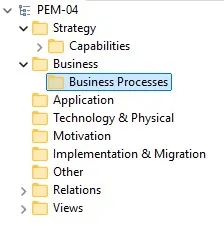
This is not a universal structure, and I would not spend days trying to find the perfect hierarchy. The purpose is to make it obvious where a concept belongs and to make browsing the repository predictable. Reorganizing parts of the elements and folders in the repository will still happen. Just don’t loose too much time on this organisation yet.
There is also an important distinction between packages and views. A package tells us where a concept is maintained. A view tells us where that concept is used to communicate a particular story.
That distinction becomes increasingly important as the model grows.
Name things so that they can be reused
Naming is one of those subjects that sounds trivial until a repository contains several hundred elements.
The basic rule is straightforward: give an element a stable, meaningful business name rather than a name that describes where or when it is being used.
For example, if GridFlow has an application responsible for managing
outages, I would call it Outage Management, not
Outage Management — Project Phoenix or New OMS 2027. And even if it’s an
idea pitched to management to replace the legacy Outage Management tool,
and the initial referrals were Outage Management 2.0, it’s rare that this
is the best name.
The same applies to capabilities, processes and assets. Avoid unnecessary abbreviations, inconsistent capitalization and names that only make sense to the person who created them.
The exact naming convention will depend on the organization, but
consistency matters more than finding the theoretically perfect
convention. If one architect creates Asset Management, another creates
Manage Assets, and a third creates Asset Mgmt, the repository has
three concepts that may or may not mean the same thing.
That is exactly the kind of ambiguity a modeling convention should prevent. Having such ambiguity leads to uncertainty in reusing the element, and it could even hint into “it’s common to each have our own element”, which is not advised at all.
The repository is not a collection of diagrams
This is where the difference between a modeling repository and a diagramming tool becomes most valuable.
Suppose we create a diagram showing GridFlow’s asset management
landscape. We might place an Asset Management capability on the
diagram, together with applications such as Asset Management,
Work Management and Outage Management.
Later, we create another diagram showing how planned maintenance works. We need some of the same concepts again.
Do not redraw them as new elements. Reuse the existing elements.
The diagram is only a view of the model. The model element is the reusable architectural concept.
This may sound obvious, but it is one of the most important habits to establish early. If every diagram becomes its own little model, consistency disappears quickly. The repository then contains several slightly different versions of what should have been the same architectural concept.
A small example: assets, works and outages
Let’s make the example a little more concrete.
GridFlow operates a transmission network containing assets such as substations, transformers and transmission lines. These assets need to be maintained throughout their lifecycle. Maintenance activities are organized as works, and most works can only be performed when the relevant asset is safely taken out of service.
That creates a useful relationship between three areas of the business:
Asset Management maintains knowledge about the assets and their lifecycle.
Work Management plans and coordinates the work that needs to be performed on those assets.
Outage Management plans and coordinates the outage required to make an asset safely available for the work.
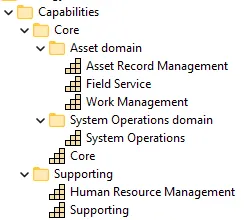
Now imagine a work order for replacing a component in a transformer. The work refers to a specific asset. Before the work can start, an outage needs to be planned and approved for that asset. The outage therefore is not simply an independent business activity: it enables the work to take place safely.
This is exactly the kind of relationship that makes a central model valuable.
We can represent the concepts once and then use them in several different views. One view can tell the asset management story, another can explain the work management process, and a third can show the application landscape supporting those activities.
The same Asset, Work and Outage concepts can therefore appear in
different stories without being duplicated.
That is the real value of reuse: not saving yourself a few clicks whenx drawing a diagram, but maintaining a consistent body of architectural knowledge that can be looked at from different perspectives.
Views are where the story comes together
A repository full of well-organized elements is useful, but nobody wants to read the repository as a database.
Views are where we turn the model into something people can understand.
For our initial GridFlow repository, I would start with only a few views:
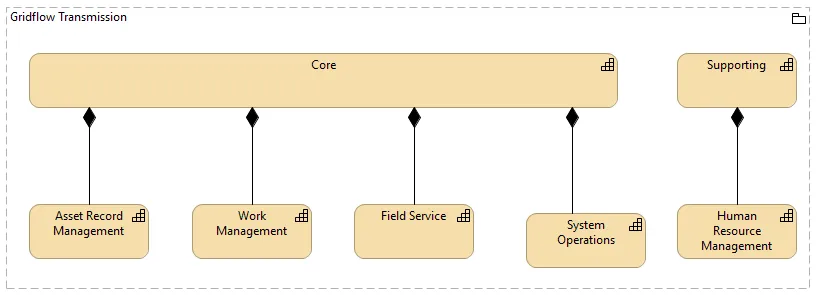
Business capability map overview
The first view gives a high-level picture of what GridFlow needs to be capable of doing as an organization. It should be useful to someone discussing the business rather than someone configuring an application.
Asset, work and outage management view
The second view zooms in on a particular business area. It can show how assets, works and outages relate to one another, making the operational story visible. Next to having a view on the business processes, I believe it’s necessary to indicate the business information concepts that play a role in this domain. Clearly indicating the concepts and how they relate opens the way to a more clean applicative split.
Application landscape
The third view moves from business concepts towards the applications
that support them. It might show Asset Record Management, Work Management,
Outage Management and their important relationships.
The important thing is that these views do not contain three independent copies of the architecture. They are three windows into the same model.
That distinction is worth making explicit:
The model contains the knowledge. The views communicate the knowledge.
As we will explore in a later episode, different diagrams answer different questions. For now, the important lesson is simply to resist the urge to create a new element every time a new diagram is required.
Keep the first repository small
For the first version of the GridFlow repository, I would intentionally keep the number of concepts limited.
We might have a handful of business capabilities, a few business processes, a small number of asset and work-related concepts, several applications and a few technology elements. Together, that should be enough to create several meaningful views without creating a maintenance burden.
This is also a good way to test the conventions established in the previous episodes.
Can a new architect understand where to find an application? Is it obvious whether two elements represent the same concept? Can an existing element be found and reused? Does a view still make sense when someone who did not create it opens it six months later?
If the answer to those questions is yes, the repository is already doing useful work.
What about versioning?
A repository is not static. Architecture changes, applications are replaced, capabilities evolve and new solutions are introduced.
I would therefore treat versioning as part of the repository’s operational discipline, but I would not make tool-specific version-control features the focus here. The important principle is simply to make sure that the model has a controlled lifecycle, that changes can be traced or recovered where necessary, and that the team knows which version of the repository is the current one.
Avoid turning the repository into a graveyard of files such as:
Architecture_final.archimate
Architecture_final_v2.archimate
Architecture_final_v2_really-final.archimate
The exact technical approach will depend on the organization, the tool setup and the way architects collaborate. The modeling principle remains the same: the repository should be treated as a maintained asset, not as a collection of disposable working files.
A small set of conventions
By this point, our repository conventions can remain pleasantly simple:
- Organize folders around architectural knowledge, not projects.
- Keep business, application and technology concepts in predictable places.
- Use stable and meaningful names.
- Reuse existing elements instead of recreating them for each diagram.
- Keep the model separate from the views that communicate it.
- Start with a small number of concepts and grow the repository deliberately.
- Treat the repository as a maintained architectural asset.
None of these rules is particularly complicated. Their value comes from applying them consistently.
Downloads
To make this episode practical, the accompanying download will contain the small GridFlow Transmission example repository used throughout the article, together with the example views and a short README explaining how the model is organized.
The intention is not to provide a finished enterprise architecture that you can copy into your own organization. Instead, it gives you something small enough to open, inspect and change, while demonstrating the principles behind the structure.
In particular, look at how the same business and application concepts are reused across different views. That is the part I would encourage you to experiment with: change one element in the model and then look at the views in which that element is used.
That small exercise makes the difference between drawing architecture and maintaining an architecture model surprisingly clear.
Looking ahead
We now have the beginnings of a repository, but we have deliberately avoided one of the most interesting questions: what stories should those views actually tell?
A capability map, a process view and an application landscape may all describe the same enterprise, but they answer very different questions for very different audiences.
That will be the subject of the next episode: moving from a repository full of reusable concepts to views that deliberately tell a story.